Metafield Map
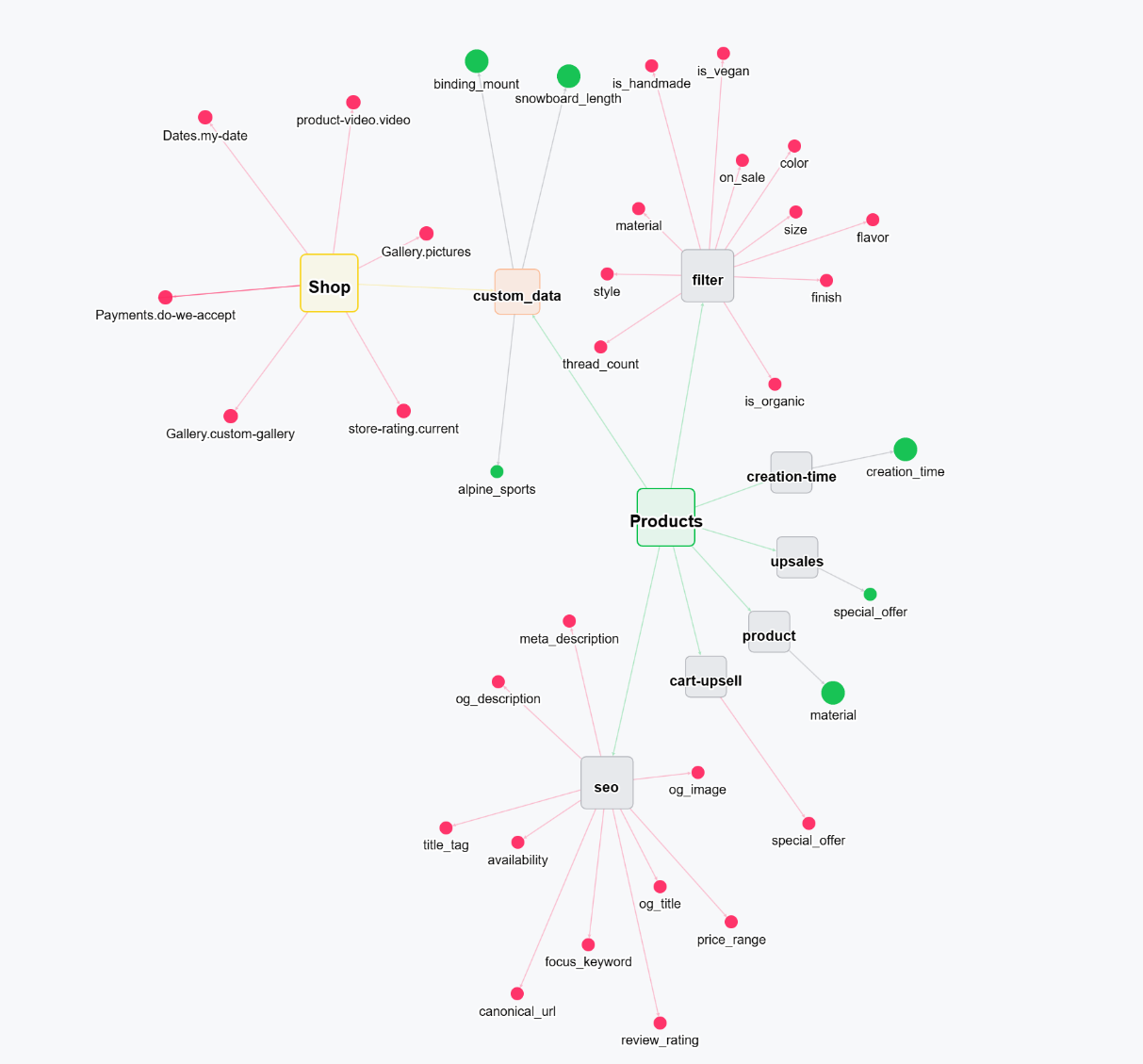
The Metafield Map is an interactive graph view that visualizes every metafield across your store as a connected network. Instead of scrolling through flat lists, you see your entire metafield architecture at a glance, namespaces, keys, owner types, and the relationships between them.
Why Use the Metafield Map?
As your store grows, metafields multiply fast. Different apps create them, different teams manage them, and before long you have dozens (or hundreds) of metafields scattered across products, collections, orders, and more. The Metafield Map gives you a bird's-eye view so you can:
- Understand your metafield architecture : See how metafields are organized across namespaces and owner types without digging through individual resources.
- Spot relationships instantly : Trace which metafields connect to which resources, and how namespaces group related data together.
- Identify unused or orphaned metafields : Detect metafields that are defined but no longer referenced anywhere, in your theme, products, or collections. These are candidates for cleanup.
- Plan changes with confidence : Before renaming, deleting, or restructuring metafields, see exactly what depends on what so you avoid breaking things downstream.
How It Works
The map renders each metafield as a node and draws edges between related nodes, for example, metafields that share a namespace, belong to the same owner type, or reference each other.
Node Types
| Node | Represents |
|---|---|
| Owner nodes | Resource types like Shop, Products, Collections, Orders |
| Namespace nodes | Groupings such as custom_data, product, or your own custom namespaces |
| Metafield nodes | Individual metafields identified by their key |
Reading the Graph
- Clusters of tightly connected nodes indicate metafields that work together, for example, a set of product-level metafields under the same namespace.
- Isolated nodes sitting far from any cluster may be orphaned metafields worth investigating.
- Hub nodes with many connections (like a heavily-used namespace) show you where the complexity lives in your store.
Dependency & Impact Mapping
One of the most powerful aspects of the Metafield Map is answering the question: "Where is this metafield used?"
Trace Usage Across Your Store
For any metafield, the map shows you:
- Theme references : Is this metafield displayed on your storefront through theme blocks or Liquid code?
- Product connections : Which products have values set for this metafield?
- Collection associations : Is this metafield used to organize or filter collections?
- Cross-references : Does this metafield reference other metafields or resources?
Detect Orphaned Metafields
Over time, metafields accumulate. Apps get uninstalled, themes get swapped, and metafields that once served a purpose quietly become dead weight. The Metafield Map highlights metafields that exist in your store but are not connected to any active theme section, product display, or automation, so you can clean them up and keep your store lean.
Keeping Your Store Organized
The Metafield Map is a planning tool. Use it to:
- Audit your metafield structure before migrating themes or switching apps
- Onboard team members by giving them a visual overview of how your store's data is organized
- Document your setup : a screenshot of your map is worth a thousand spreadsheet rows when explaining your metafield architecture to a developer or agency
- Maintain consistency : spot naming inconsistencies or duplicate metafields that crept in over time
Visit the Metafield Map regularly as you add new metafields or install new apps. Catching orphaned or redundant metafields early keeps your store clean and your workflows predictable.